Outputs

In planning for REF and aiming to achieve the highest possible score, UoAs undertake regular internal review processes in order to 'predict' scores for prospective REF 2021 submission. UoAs will ask researchers to 'propose' their best work in the Pure system to feed into this process.
Follow our steps below to propose outputs for review for REF 2021
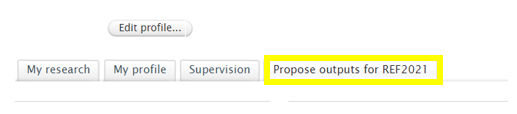
On your personal overview page in Pure, click on the tab, ‘Propose outputs for REF 2021’ (this tab is located under your Edit profile button – see screenshot below).
Click the blue button entitled ‘Propose research outputs for REF 2021. Your list of outputs (recorded in Pure) published in the period 2014 to 2019 will now appear
Scroll down the list of outputs and click on the button ‘Propose for REF 2021’ for those outputs you wish to submit for review.
Provide a ranking for your output (1st, 2nd, 3rd and 4th choice or alternate) and include a short description as to why you are proposing this output for review. Please note that your ranking of outputs are provisional can be changed over the course of the REF period. Click update and then Save (see screenshot below). Your REF Champion will now be able to record comments from reviewers and grade outputs.

Note that grades for all outputs will only be visible to REF Champions and, where mandated, particular administrative or clerical staff. If you wish to see the grades for your outputs, or have questions in relation to your UoA assignment, please contact your REF Champion.
If you have any queries regarding the Pure system, please contact puresupport@qub.ac.uk or phone ext 1139/2581

Follow our instrutions below on how to record reviewer comments and grades for outputs which have been proposed for REF in my UoA?
Log onto Pure and click on the REF 2021 tab in the top menu.
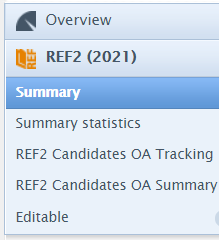
On the left-hand side of your screen, click on the tab entitled REF 2 (2021). Five sub-categories are available under REF 2 (2021) – please select ‘Summary’.
Following this, a REF 2 summary table will be presented displaying the names of staff in your UoA and the number of outputs which have been proposed for REF (see column, entitled ‘Proposed’).

Those outputs proposed for REF may be recorded as Prioritised (i.e. top 4 outputs, as ranked by the proposer) or Alternate (i.e. substitute outputs, outside of top 4). The no of outputs, displays the total number of outputs which are currently marked as proposed (i.e. the number of prioritised outputs plus the number of alternate).
Under the column ‘Proposed’, click on the numbers presented against each individual to see the list outputs. Click on the title of the output you wish to record comments and grade. The REF 2 record will now be displayed.
In the REF 2 record, you will see the submitter’s reason for proposing the output and their personal rank. Under the section, ‘Workflow for selection to REF2021’ mark the output from ‘Proposed’ to ‘Selected for review.’

Under the section, ‘Predicted grade & peer comments’, click on the button ‘add peer comment’ to record the name, comments and grade of each reviewer. Click ‘create’ to upload this information to the REF 2 record. Add as many peer comments and grades as you wish.
Under the heading ‘Predicted grade’ you can record the overall grade for the output. Note that grades for all outputs will only be visible to REF Champions (as per their own UoA) and, where mandated, particular administrative or clerical staff. You may wish to send a message to the submitter by clicking on ‘Write a comment to the submitter’ button.
Under the section ‘Information to sub-panel’, record whether this output is being requested for double-weighting.
If it is clear from the review process that the output will not be considered for REF, under the section ‘Workflow for selection to REF 2021’ mark the record as ‘Not selected for REF 2021’. At this stage, do not mark any outputs as ‘Selected for REF 2021’ as this will be used closer to the submission date when final decisions are taken. At this stage, we are simply compiling a list of possible REF outputs and excluding those for which submission is entirely unlikely.
Do not change the workflow status from ‘Entry in Progress’ to ‘Checking Underway’. Again, this will be used closer to the submission date when final decisions are taken.
Click the blue ‘Save’ button located at the bottom of the page to record any changes.
If you have any queries regarding the Pure system, please contact puresupport@qub.ac.uk or phone ext 1139/2581


For Pure help and training contact puresupport@qub.ac.uk or visit the Pure support pages for more information.
